
monday.com new features August 1, 2022
1. Emails & activities templates - new behavior Templates in Emails & Activities allow users to save any email they would like as a template and use it to automate the communication flow. If users choose "{} Columns" in the lower right corner of the editor, they can pull in data from any column on the board and save this as a template for a faster communication with their customers. To save a template:
Create email
Click on the Templates in the bottom right corner
Click +Save as new template
Add the name of the template
Click Save
Once templated is created, users can rename, update and delete them.
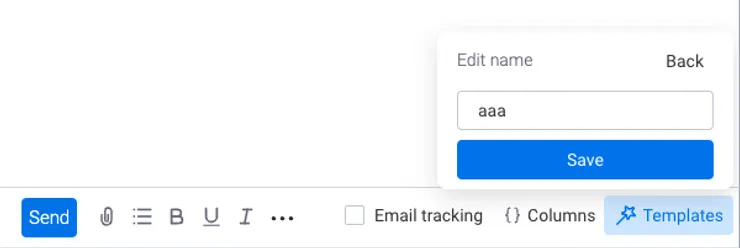
Renaming template Hover over the template --> Click on the pencil icon --> edit the name --> Click Save
Updating template's content Hover over the template --> Click on the clock icon to update template The template content will be overridden with the content from the email editor
Deleting template Hover over the template --> Click on the trash bin icon to delete the template
Important: templates are user-specific and are not applied throughout account. Currently, users are unable to share templates with other members in the account.
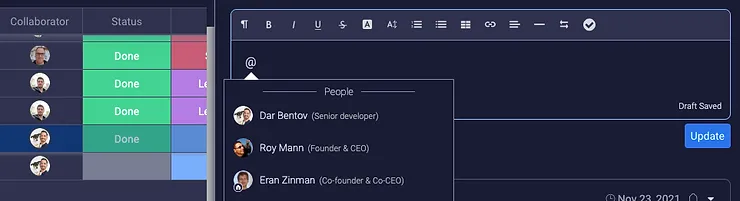
2. New “mentioned” suggestions The Mention suggestions have improved!Before: Mention suggestions were based only on your last mentions without considering the context for the post/reply. After:When writing/editing an update: The prioritized mention suggestions will be the user who created the item and users who appear in person columns for the item.
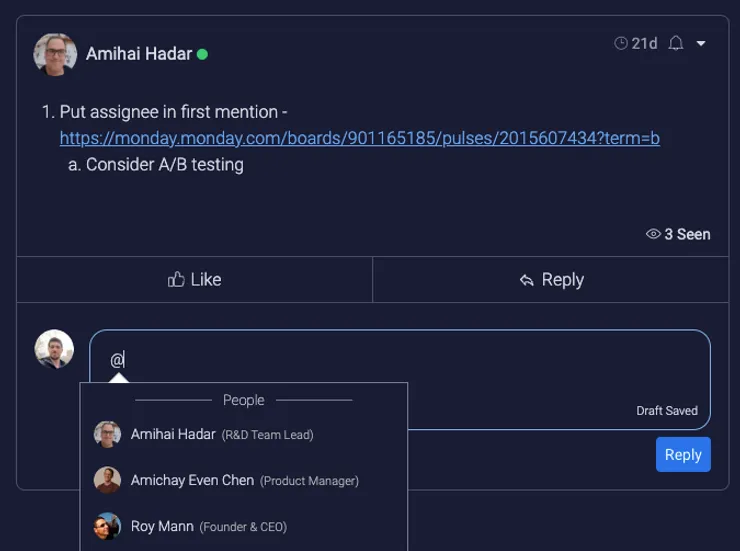
When writing/editing a reply: the prioritized mention suggesting will be the user who wrote the update and the user who posted the last reply.
💡 Stay tuned for more updates in the future!
👉👉Start your free trial with us today: www.achievan.com/mondaydotcom
SHARE


Subscribe now.
Sign up for our newsletter to get the most interesting stories of the day straight to your inbox before everyone else
We help teams improve Productivity by implementing no-code software solutions
A Division of
Execute Strategy, Inc.
Connect with Us


Copyright © Execute Strategy Inc. O/A Achievan 2026