
monday vs. Smartsheet Lingo
When it comes to work management and project collaboration, monday.com and Smartsheet are two of the most popular platforms for businesses of all sizes. While they serve similar purposes and cater to many of the same use cases, each platform has unique features and strengths. In this blog post, we’ll dive into the key differences between the two, comparing their Boards vs. Sheets, Forms, Views vs. Reports, Dashboards, Automations, Formulas, and Add-ons (including Control Center, Dynamic View, Calendar, and Resource Management). By the end, you’ll have a clearer understanding of which platform best fits your team’s needs.
1. Boards vs. Sheets
One of the biggest differences between monday.com and Smartsheet is how they structure and display work. Both platforms help teams track tasks, projects, and workflows, but they take distinct approaches to organizing information:
monday.com: Boards for Visual Workflows
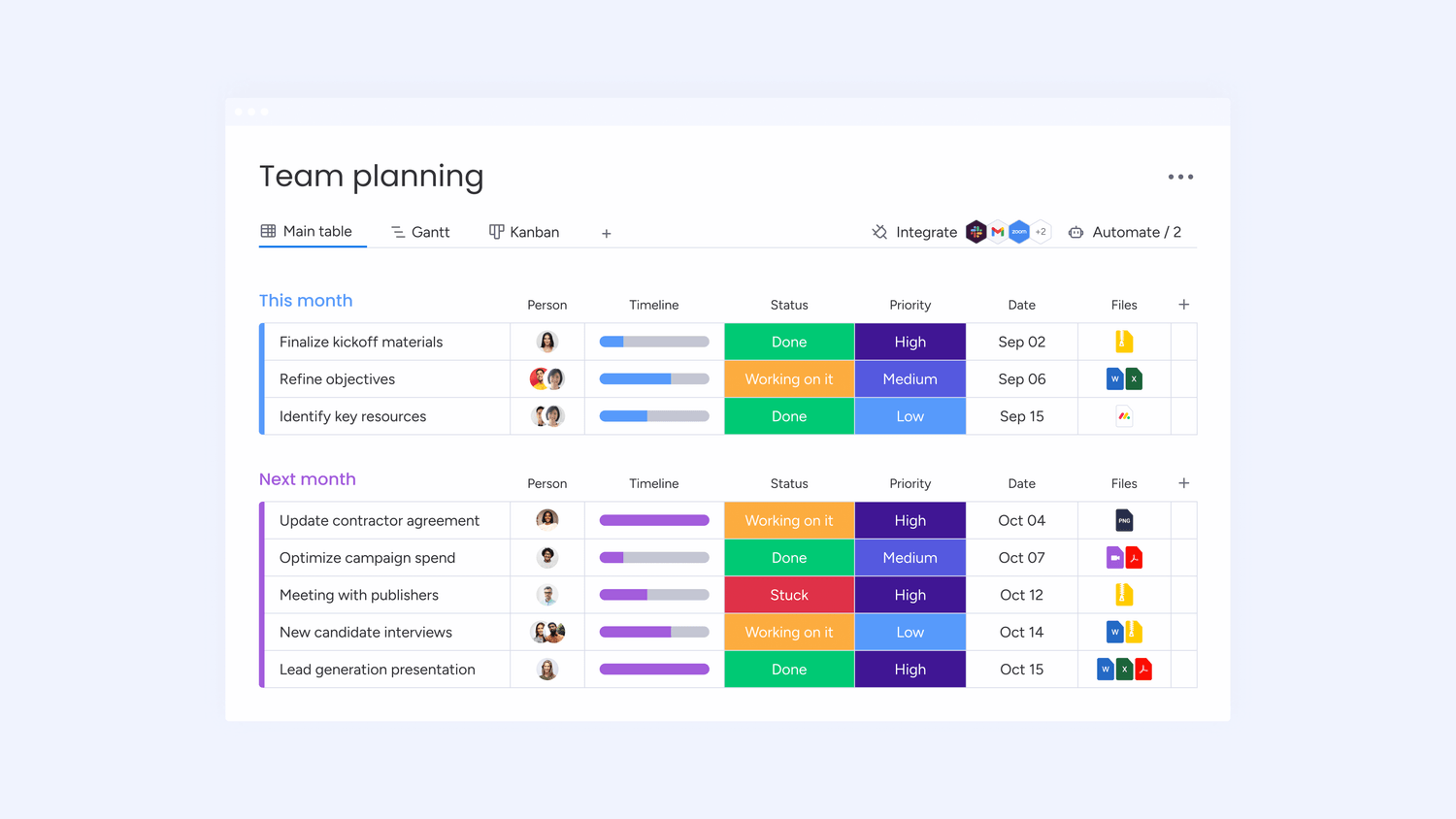
monday.com uses a board-based system designed for flexibility and ease of use. Each board acts as a workspace where teams can create, assign, and track tasks. Within a board, users can customize columns to display:
Task status (e.g., "In Progress," "Completed")
Due dates and owners
Priority levels
Custom labels and automation rules
Boards can be drag-and-drop friendly, making it easy to move tasks across different phases. The visual layout is colorful and intuitive, making it especially appealing for teams that prefer an engaging, non-spreadsheet format.
Best for: Teams that prefer a flexible, visual, and intuitive approach to work management.
Smartsheet: Sheets for Structured Workflows
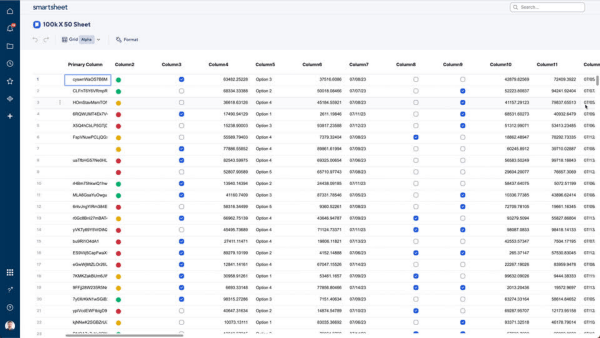
Smartsheet, on the other hand, is designed around Sheets, which function similarly to spreadsheets but with enhanced project management capabilities. Unlike traditional spreadsheets, Smartsheet sheets allow for automation, collaboration, and real-time updates. Each row represents a task, and columns can hold different types of data, including:
Task details (names, owners, dates)
Dropdown lists for categories or statuses
Formulas for calculations and dependencies
Attachments and comments for collaboration
Best for: Teams that need data-driven, structured, and formula-heavy project management.
2. Forms
Forms are essential for gathering data, collecting project requests, and streamlining workflows. Both monday.com and Smartsheet offer form-building capabilities, but they cater to different needs and user experiences.
monday.com: Customizable Forms for Easy Data Collection
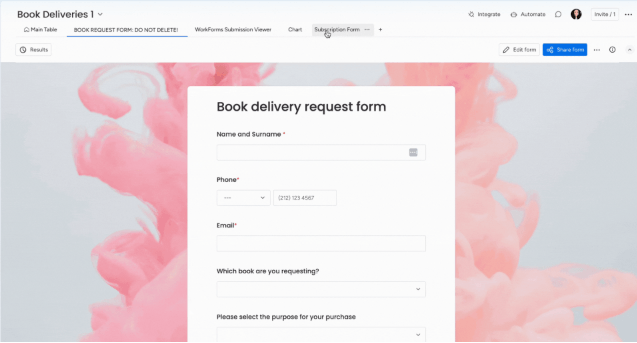
monday.com’s Forms allow users to convert board columns into a shareable form, making data collection simple and intuitive. These forms are visually appealing and integrate seamlessly with existing workflows.
Drag-and-drop customization – Easily add or remove form fields based on board columns.
Automatic data population – Submissions go directly into a designated board for real-time tracking.
Custom branding – Add your company logo and personalize forms to match your brand identity.
Conditional logic – Show or hide form fields based on responses for a dynamic experience.
Easy sharing – Share via a link or embed on a website for seamless data collection.
Best for: Teams looking for a visually appealing, easy-to-use form builder that integrates effortlessly into a board-based workflow.
Smartsheet: Forms with Advanced Data Structuring
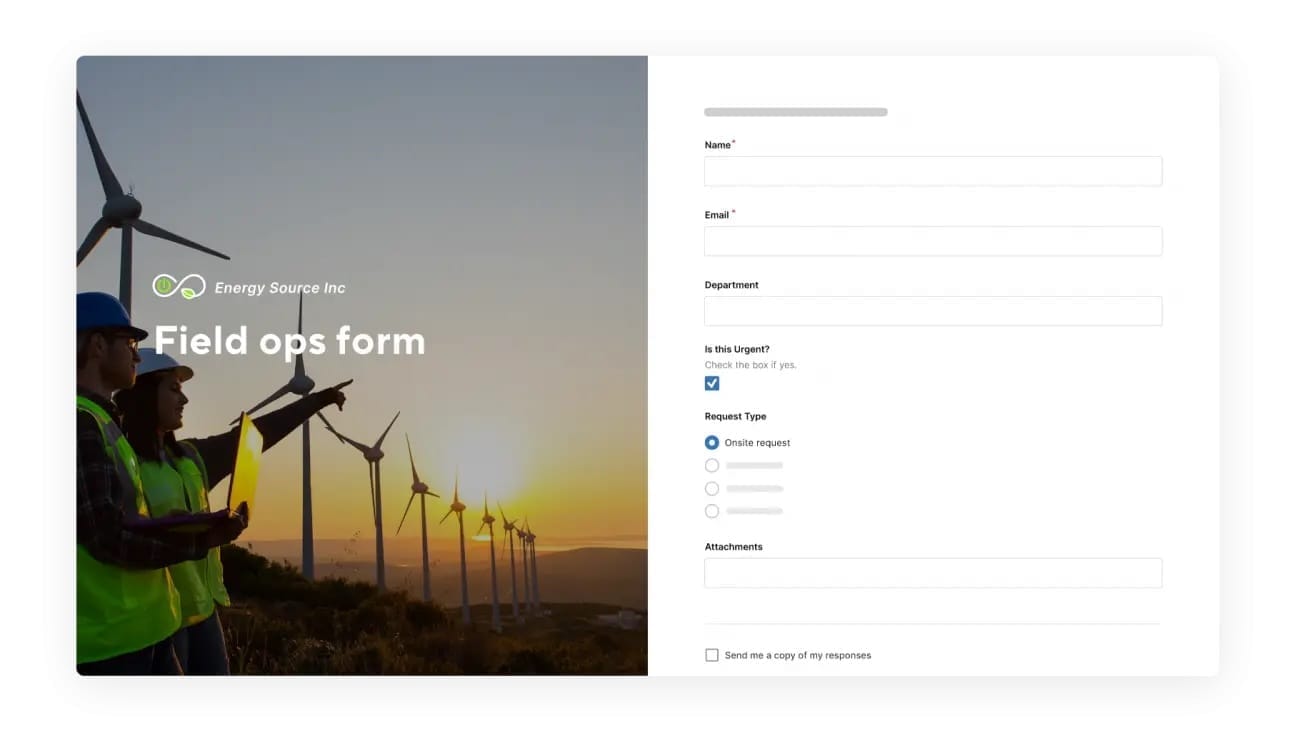
Smartsheet’s Forms are designed for structured data collection, making them ideal for surveys, project requests, and approvals. Unlike Monday.com, Smartsheet forms link directly to a Sheet, ensuring that every submission follows a structured workflow.
Direct-to-sheet integration – Submissions automatically populate a designated sheet for seamless data management.
Conditional logic – Customize form behavior based on user inputs.
Custom validation – Set rules to ensure accurate data entry (e.g., email format, number ranges).
Automated workflows – Trigger alerts, approvals, or assignments based on form responses.
Multi-step approval process – Ideal for structured workflows requiring multiple reviews.
Best for: Teams that need a structured, spreadsheet-based approach with advanced validation and automation capabilities.
3. Views vs. Reports
When managing projects, having the right perspective on your data is crucial. Both monday.com and Smartsheet offer ways to visualize and analyze work, but they take different approaches:
monday.com provides multiple Views to customize how you see your boards
Smartsheet focuses on Reports, allowing users to extract and analyze data across multiple sheets
monday.com: Views for Dynamic Work Visualization
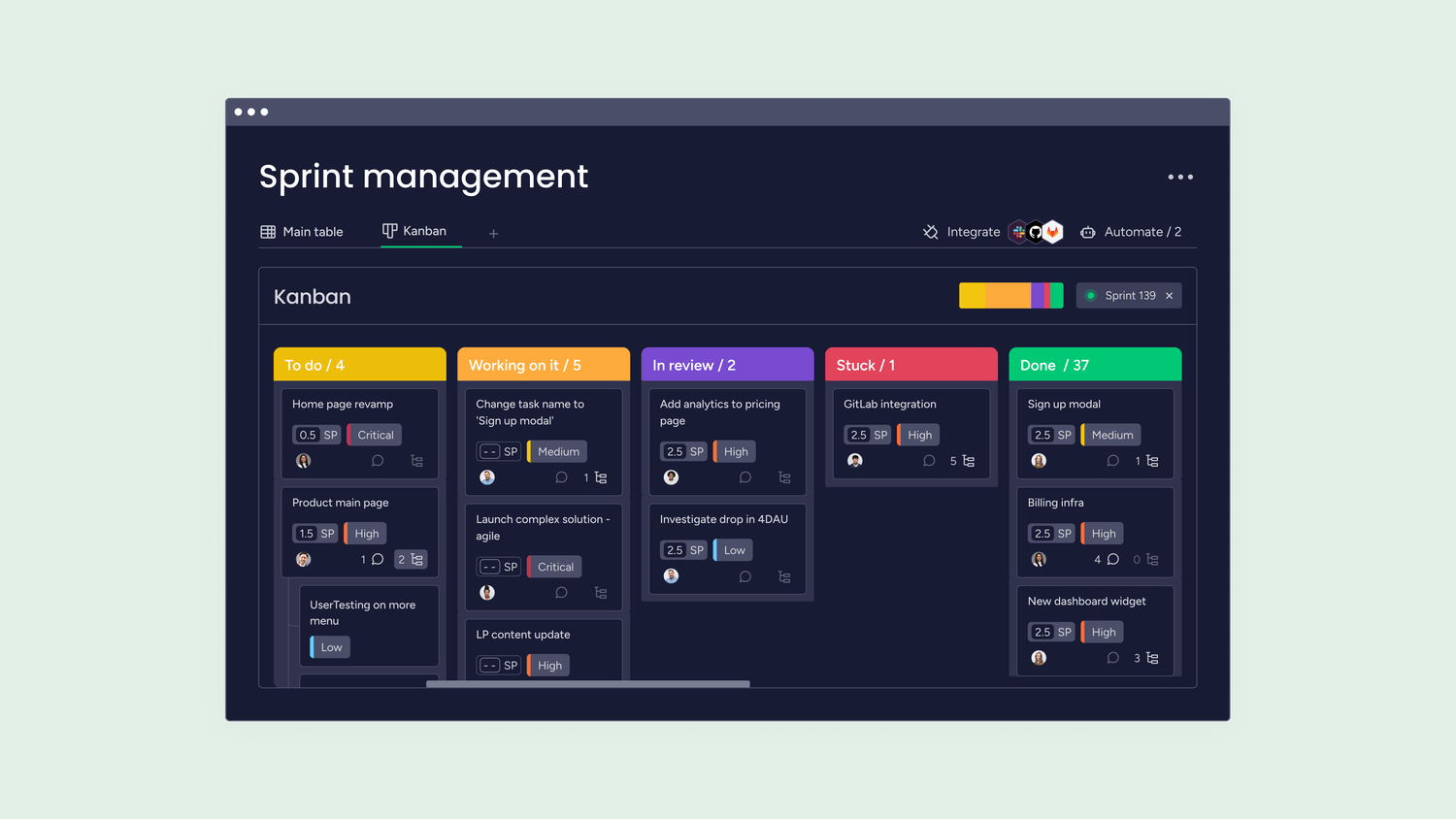
monday.com offers a variety of Views to let users see their projects in different formats. This flexibility ensures that teams can choose the best way to organize and track their work.
Table View: A simple grid for organizing and sorting tasks.
Kanban View: A drag-and-drop board for agile workflows.
Calendar View: A date-focused layout for scheduling and deadlines.
Timeline View: A Gantt-style chart to track project progress over time.
Workload View: A resource management tool to balance team capacity.
Chart View: Customizable graphs to track key metrics and trends.
Best For: Teams who need real-time, interactive ways to view and manage their tasks dynamically.
Smartsheet: Reports for Data Consolidation and Analysis
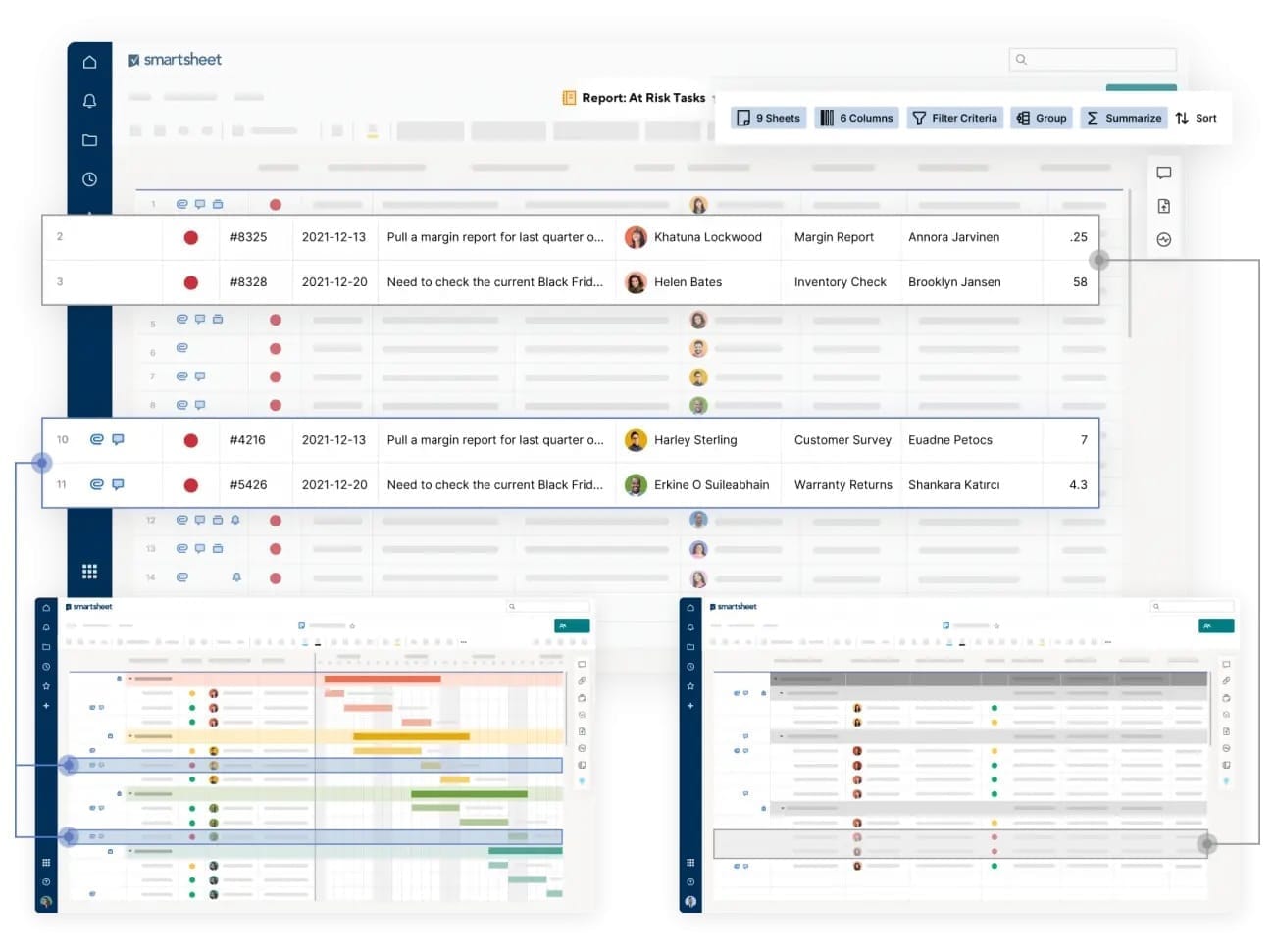
Smartsheet’s Reports allow users to pull in and analyze data across multiple sheets, making it ideal for teams working with structured data. Reports are not just static documents—they update in real-time and can be shared, filtered, and formatted for different audiences.
Cross-Sheet Reporting: Pull data from multiple sheets into a single report.
Filter & Group Data: Customize reports based on criteria like status, deadlines, or team assignments.
Interactive Dashboards: Embed reports into dashboards for executive overviews.
Automated Report Updates: Ensure reports always show the latest data.
Best For: Teams that need structured, data-driven reporting with custom filters, real-time updates, and cross-sheet consolidation.
4. Dashboards
monday.com and Smartsheet offer Dashboards to help teams track key metrics, monitor progress, and visualize data in one central location. While both platforms provide powerful reporting capabilities, their dashboard functionalities differ in flexibility, customization, and depth.
monday.com: Interactive and Customizable Dashboards
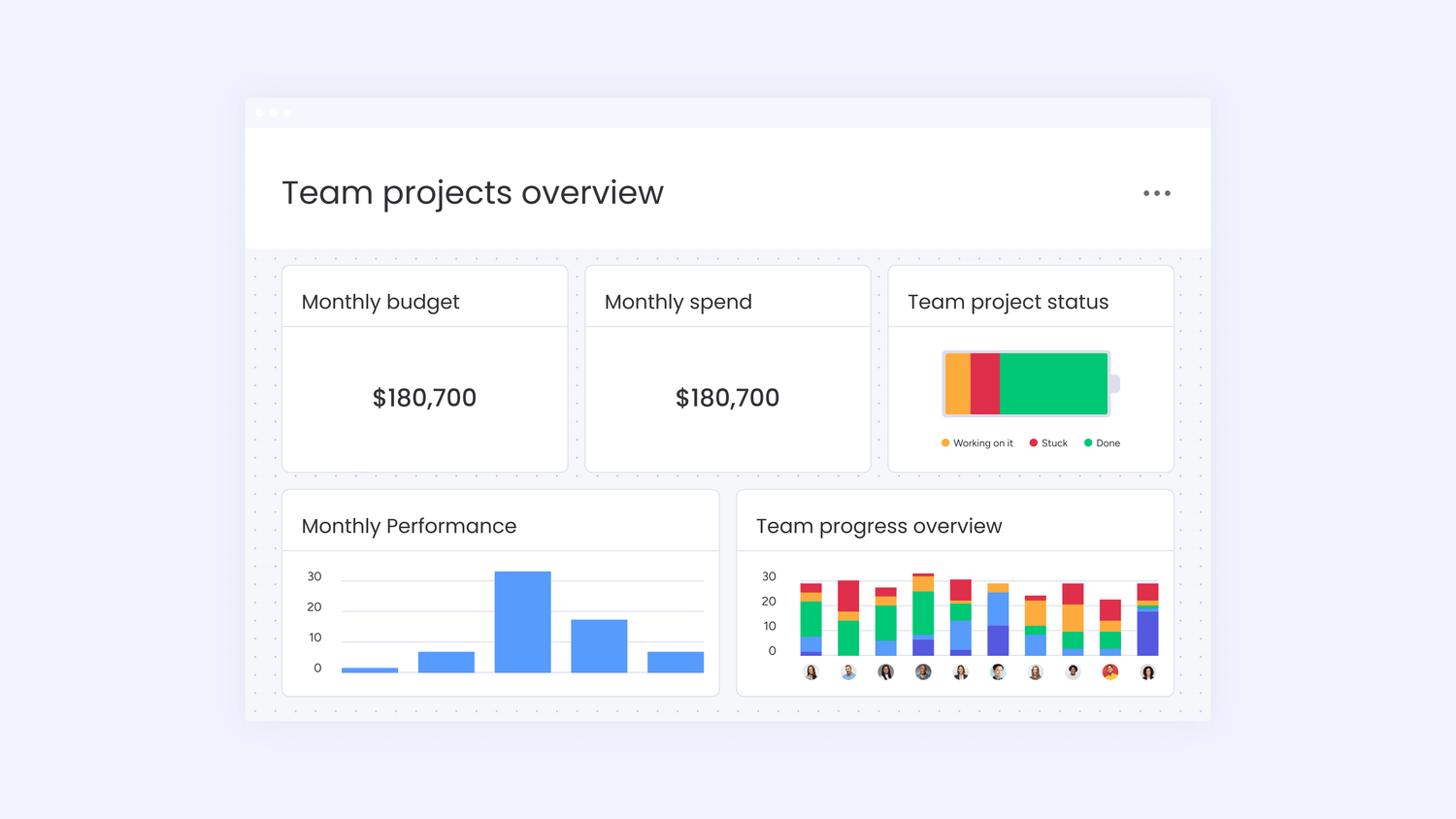
monday.com dashboards are designed for quick insights and real-time updates. They offer a visually engaging and easy-to-use interface, allowing teams to pull data from multiple boards and display it in a way that suits their needs.
Drag-and-Drop Customization: Easily arrange widgets to display key metrics.
Multiple Widget Types: Charts, graphs, workload overviews, goal tracking, and more.
Real-Time Data Syncing: Automatically updates as data changes across boards.
Integrations: Connects with tools like Google Analytics, Jira, Salesforce, and more.
Collaboration Tools: Share dashboards with team members for better alignment.
Best For: Teams that want a highly visual, interactive, and customizable dashboard experience with real-time updates.
Smartsheet: Data-Rich Executive Dashboards
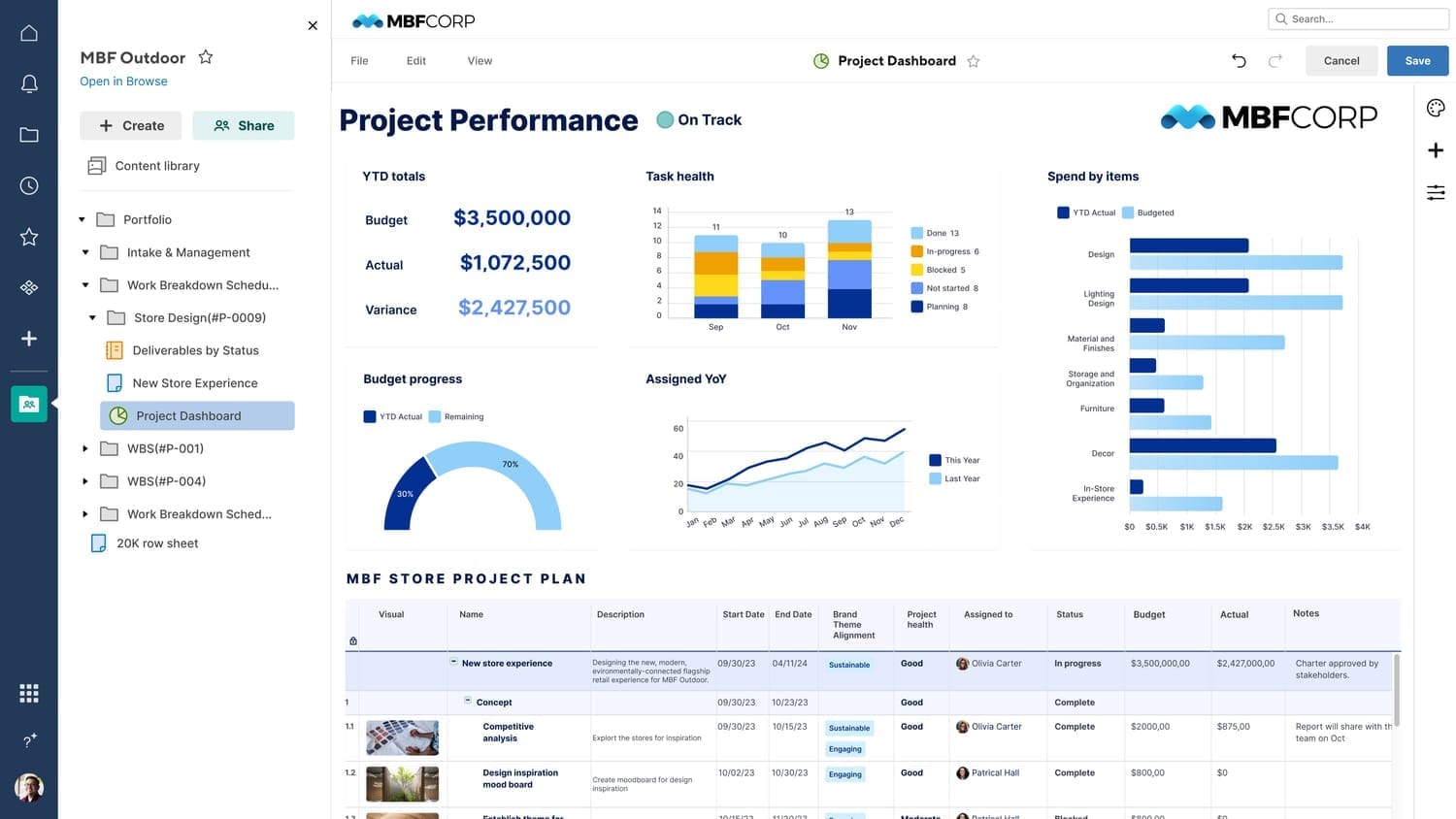
Smartsheet dashboards focus on detailed reporting, analytics, and executive overviews. They provide a structured, data-driven approach to tracking project health, key performance indicators (KPIs), and strategic objectives.
Cross-Sheet Data Consolidation: Pull data from multiple sheets into one view.
Customizable Widgets: Charts, graphs, rich text, embedded reports, and web content.
Advanced Reporting: Combine real-time data with historical trends for deeper insights.
Permission Controls: Share dashboards with different access levels for executives, managers, or team members.
Enterprise-Level Security: Ensures data protection for compliance-heavy industries.
Best For: Organizations needing data-driven, high-level insights for executive reporting and cross-project analysis.
5. Automations
monday.com and Smartsheet offer automation features that help teams eliminate manual tasks, streamline workflows, and boost productivity. While both platforms provide powerful automation tools, they approach automation differently in terms of ease of use, customization, and complexity
monday.com: User-Friendly, No-Code Automations
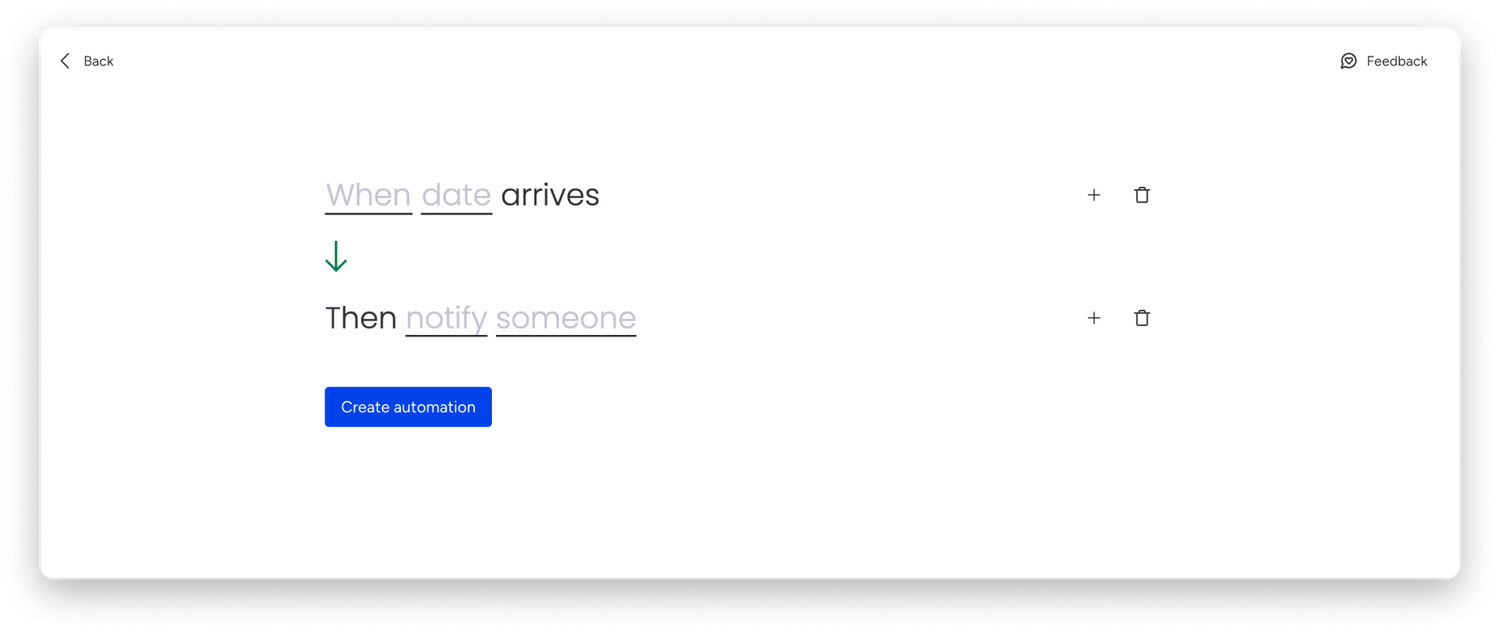
monday.com makes it easy to automate repetitive tasks using simple, no-code automation recipes. These automations are based on an if-this-then-that logic, allowing users to set up triggers and actions effortlessly.
Pre-Built Automation Recipes: Select from ready-made automation templates.
Customizable Triggers & Actions: Set up automations like task assignments, status changes, due date reminders, and notifications.
Integration Automations: Automate workflows across third-party apps like Slack, Outlook, Google Drive, and Jira.
Dependency-Based Automations: Automatically adjust deadlines when a task is completed or delayed.
Looping & Recurring Automations: Schedule repeating tasks without manual input.
Best For: Teams looking for easy-to-set-up, no-code automations to streamline everyday workflows without complex configuration.
Smartsheet: Advanced Workflow Automation for Complex Processes
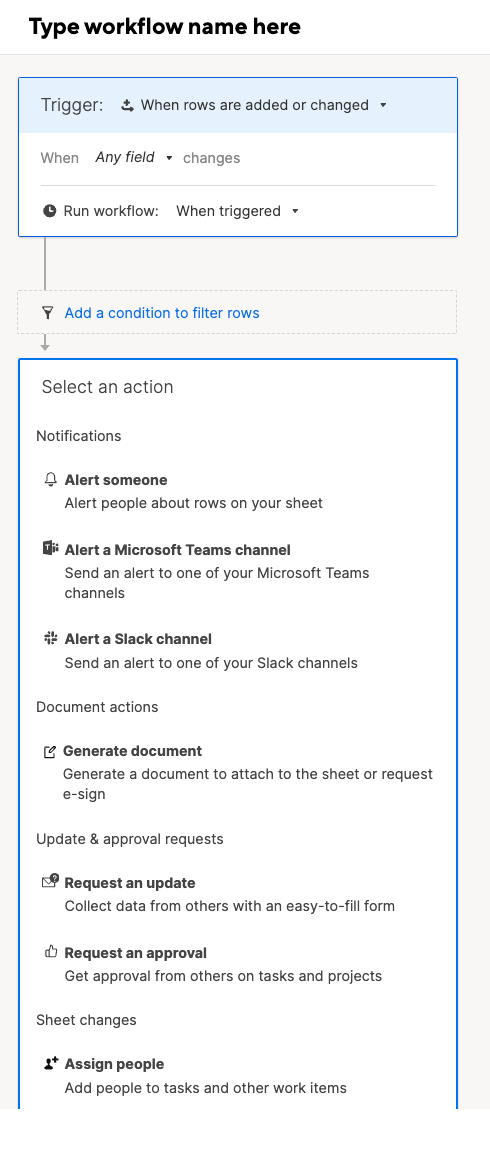
Smartsheet’s workflow automation is designed for businesses that require more advanced, multi-step automations. Using a visual workflow builder, teams can set up complex, logic-driven workflows across multiple sheets and systems.
Multi-Step Workflows: Automate sequential actions like approvals, notifications, and conditional updates.
Cross-Sheet Automations: Trigger actions based on data changes across multiple sheets.
Conditional Logic Rules: Apply custom conditions to automate specific outcomes.
Approval Workflows: Set up multi-level approvals for document reviews, budget sign-offs, and project updates.
Enterprise-Grade Security: Ensures compliance and governance for automation workflows.
Best For: Teams that need advanced, cross-sheet automation with complex workflows and conditional logic.
6. Formulas
Formulas play a crucial role in project and work management by enabling teams to calculate, analyze, and manipulate data efficiently. Both monday.com and Smartsheet support formulas, but their capabilities, complexity, and ease of use differ significantly.
monday.com: Simple, Column-Based Formulas
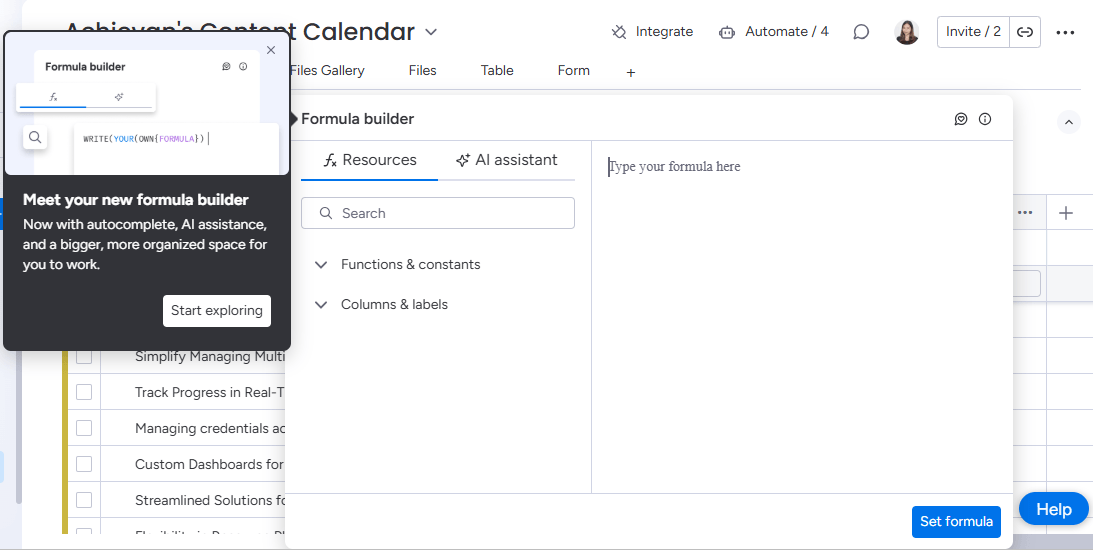
monday.com offers formula columns that allow users to perform calculations within a board. While its formula capabilities are simpler compared to Smartsheet, it provides enough flexibility for basic arithmetic, logical conditions, and text manipulations.
Formula Column: Create calculations within a single column (e.g., summing values, conditional logic, date differences).
Basic Operators: Addition (+), subtraction (-), multiplication (*), division (/), and logical expressions (IF, AND, OR).
Date & Time Calculations: Automate due dates, time tracking, and task durations.
Text & String Functions: Format text, concatenate values, and extract data.
Dynamic Updates: Formulas automatically recalculate when data changes.
Best For: Teams that need simple, board-level calculations without complex dependencies across multiple data sources.
Smartsheet: Powerful, Spreadsheet-Like Formulas
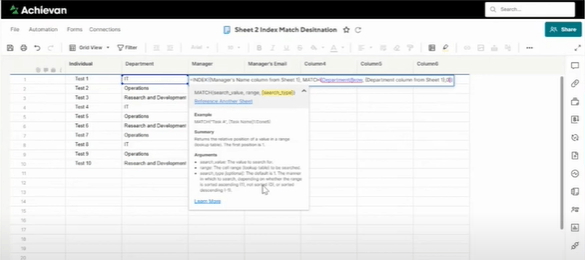
Smartsheet offers an Excel-like formula experience, making it a more powerful tool for advanced calculations and cross-sheet data management. With its spreadsheet structure, users can apply formulas to entire sheets and reference data from multiple locations.
Spreadsheet-Style Formulas: Apply formulas across rows, columns, and entire sheets.
Cross-Sheet References: Use data from different sheets in calculations.
Conditional & Logical Functions: Use IF, COUNTIF, SUMIF, VLOOKUP, INDEX/MATCH for dynamic calculations.
Advanced Date & Time Functions: Track project timelines, calculate durations, and automate date-based actions.
Aggregation & Statistical Functions: Generate totals, averages, percentiles, and more.
Best For: Teams that need advanced calculations, cross-sheet data analysis, and powerful spreadsheet-like formulas.
7. Add-ons (Control Ctr., Dynamic View, Calendar, Resource Management)
monday.com and Smartsheet offer add-ons and advanced features to extend functionality and enhance workflow efficiency. However, Smartsheet provides a more extensive suite of premium add-ons tailored for enterprise users, while Monday.com integrates key functionalities directly into its platform or through third-party apps.
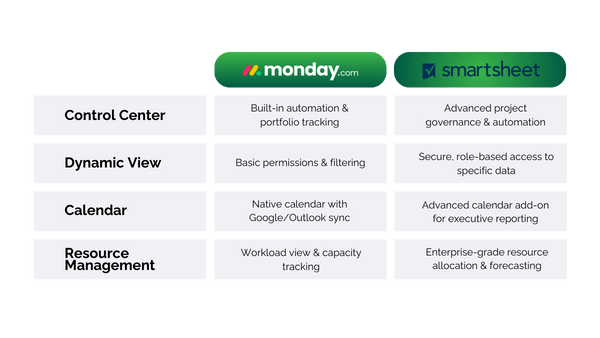
monday.com: Extending Functionality with Integrations & Apps monday.com enhances its platform through native integrations, apps, and extensions available in its Marketplace. While it doesn’t have built-in add-ons like Smartsheet, it provides a flexible and customizable ecosystem for teams to connect their favorite tools.
Marketplace Apps: Access various third-party integrations for reporting, automation, and analytics.
Advanced Workload & Resource Management: Track team capacity and workload with customizable views.
Google & Outlook Calendar Integration: Sync deadlines and events with external calendars.
Custom Automations: Build workflow automations tailored to your business processes.
Dashboard & Reporting Tools: Pull data from multiple boards into a unified view.
Best For: Teams looking for flexible, app-based enhancements rather than built-in enterprise add-ons.
Smartsheet: Enterprise-Grade Add-Ons for Advanced Work Management
Smartsheet provides powerful built-in add-ons for organizations needing enterprise-level project governance, dynamic data control, and resource allocation.
Control Center (For Governance & Portfolio Management)
Automates project creation at scale with pre-built templates.
Ensures consistency across multiple projects.
Standardizes reporting and resource allocation.
Dynamic View (For Secure Data Sharing)
Controls what users can see and edit within a sheet.
Helps manage vendor collaboration and approvals.
Ideal for sharing limited access to external stakeholders.
Calendar App (For Advanced Scheduling)
Creates interactive and customizable calendars.
Syncs multiple projects into a single view.
Allows team members to see key milestones and deadlines.
Resource Management by Smartsheet (For Workforce Planning)
Tracks team capacity, availability, and utilization.
Helps manage workload across multiple projects.
Provides insights into project staffing and budget allocation.
Best For: Large organizations needing built-in add-ons for portfolio management, secure data sharing, and enterprise resource planning.
Which Platform is Right for You? monday.com and Smartsheet are powerful work management platforms, each excelling in different areas. monday.com offers a more intuitive, user-friendly experience with built-in features, while Smartsheet provides advanced add-ons for enterprise-level project management, governance, and resource planning.
Choosing the right tool depends on your team’s needs, whether you prioritize simplicity and flexibility or advanced control and scalability.
💡Start your free trial today and find the perfect fit for your workflow!
SHARE


Subscribe now.
Sign up for our newsletter to get the most interesting stories of the day straight to your inbox before everyone else
We help teams improve Productivity by implementing no-code software solutions
A Division of
Execute Strategy, Inc.
Connect with Us


Copyright © Execute Strategy Inc. O/A Achievan 2026